Design & Growth Digest: Aligning UX with Marketing Goals
Practical case studies on how strategic UX design, hero sections, and category cards drive conversions, engagement, and audience retention.
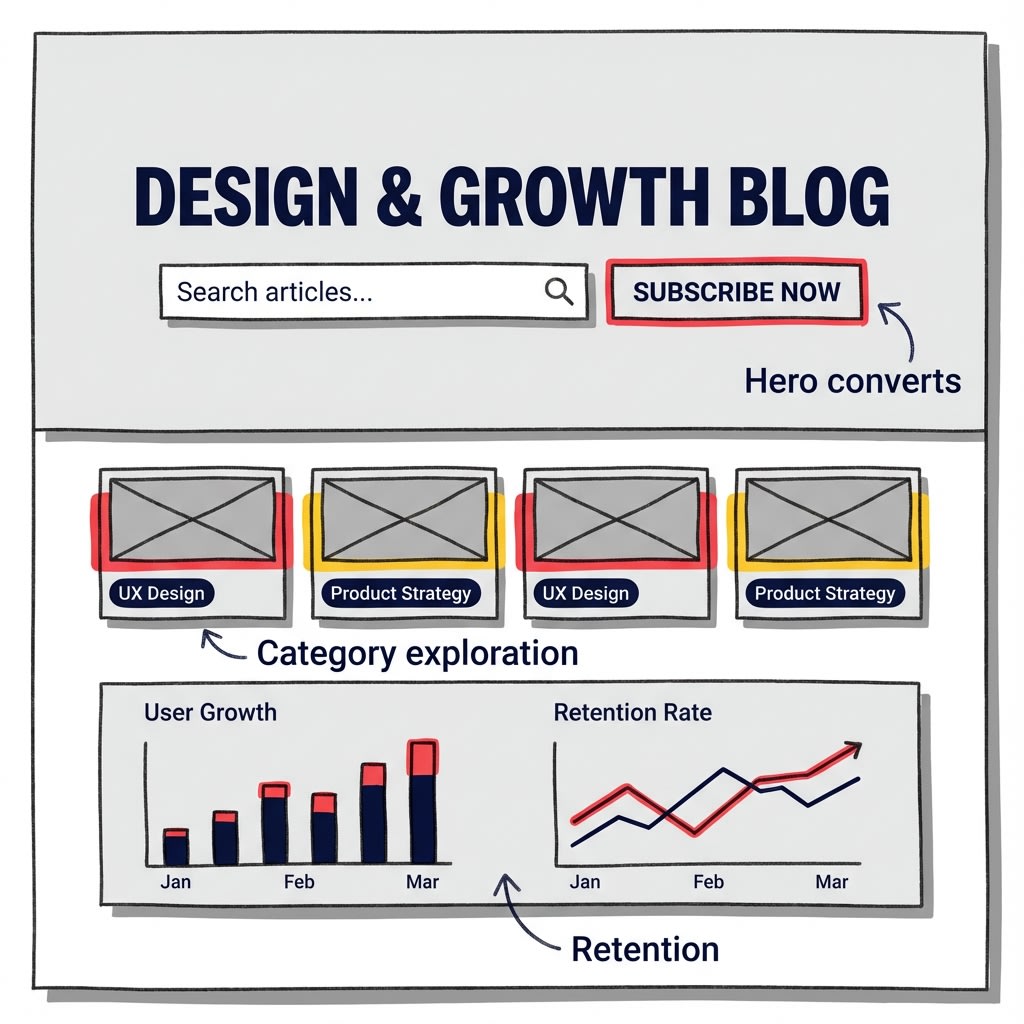
The Strategic Intersection of UX and Marketing
In today's digital landscape, the line between user experience design and marketing strategy has become increasingly blurred. Successful digital products don't just look good—they convert. This digest explores real-world case studies where thoughtful UX design directly impacted key marketing metrics, proving that design is not just an aesthetic choice but a business imperative.
According to recent industry research, companies that invest in UX see an average ROI of $100 for every $1 spent. But how exactly does this translate into tangible results? Let's dive into three critical areas where design meets growth.
Case Study 1: Hero Sections That Convert
The Problem: High Bounce Rates on Landing Pages
A SaaS company was experiencing a 68% bounce rate on their homepage despite significant traffic from paid campaigns. Users were landing, scanning briefly, and leaving without engaging with any content or CTAs.
The Solution: Redesigning the Hero Section
The design team implemented several strategic changes:
- Clear Value Proposition: Replaced generic tagline with a specific, benefit-driven headline that answered "What's in it for me?" within 3 seconds
- Visual Hierarchy: Used contrasting colors (#d64537 for primary CTA, #fbbf24 for secondary elements) to guide eye movement
- Social Proof Integration: Added trust indicators (customer logos, ratings) directly in the hero section
- Simplified CTA Strategy: Reduced from 3 competing CTAs to 1 primary action with a clear next step
Results After 30 Days:
- Bounce rate decreased from 68% to 42%
- Average time on page increased by 156%
- Click-through rate on primary CTA improved by 89%
- Overall conversion rate increased by 34%
Key Takeaways
The hero section is your digital handshake—it needs to communicate value instantly. By aligning design elements with user psychology and marketing objectives, you create a seamless path from awareness to action. The most effective hero sections answer three questions immediately: What is this? Why should I care? What should I do next?
Case Study 2: Category Cards That Drive Exploration
The Problem: Low Content Discovery Rates
An e-learning platform had thousands of courses but users were only engaging with content they found through search. Only 12% of visitors explored beyond their initial search query, leading to low session depth and missed cross-selling opportunities.
The Solution: Strategic Category Card Redesign
The UX team reimagined the category navigation system:
- Visual Differentiation: Each category received a unique color accent from the brand palette (#d64537, #fbbf24, #0f172a) making them instantly recognizable
- Micro-Interactions: Added subtle hover effects and animations that provided feedback without being distracting
- Content Preview: Included course count and popular topics within each card to set expectations
- Progressive Disclosure: Implemented a "Quick View" feature allowing users to preview category contents without leaving the page
- Personalization Layer: Used behavioral data to reorder cards based on user interests and browsing history
Impact on Key Metrics:
- Category exploration rate increased from 12% to 47%
- Average pages per session grew by 213%
- Time on site increased by 178%
- Course enrollment rate improved by 56%
- User retention (30-day) increased by 41%
Design Principles That Worked
Category cards serve as content gateways. When designed strategically, they transform passive browsers into active explorers. The key is balancing information density with visual appeal—providing enough context to spark curiosity while maintaining clean, scannable layouts. Color psychology played a crucial role here: warm accent colors (#d64537, #fbbf24) drew attention to high-value categories, while neutral tones (#f3f4f6) provided breathing room.
Case Study 3: Holistic UX Alignment for Audience Retention
The Problem: High Acquisition, Low Retention
A content platform was successfully attracting new users through SEO and social media but struggling with retention. 73% of new users never returned after their first visit, despite consuming content during that initial session.
The Solution: End-to-End Experience Optimization
Rather than isolated fixes, the team implemented a comprehensive UX strategy:
- Onboarding Flow: Created a personalized 3-step onboarding that helped users discover relevant content immediately
- Content Recommendations: Implemented AI-driven "Related Articles" sections with clear visual hierarchy
- Progress Indicators: Added reading progress bars and "Continue Reading" prompts for longer articles
- Email Integration: Designed beautiful, on-brand email templates that matched the website experience
- Mobile Optimization: Ensured seamless experience across devices with responsive design principles
- Community Features: Added commenting and social sharing with minimal friction
Retention Metrics After 90 Days:
- 7-day retention improved from 27% to 64%
- 30-day retention increased from 11% to 38%
- Average session frequency grew by 294%
- Email open rates reached 42% (industry average: 21%)
- Social shares per article increased by 167%
The Retention Formula
Retention isn't about a single feature—it's about creating a cohesive experience that makes returning feel natural and rewarding. Every touchpoint, from the initial hero section to follow-up emails, should reinforce the value proposition and reduce friction. The design system using consistent colors (#d64537 for primary actions, #0f172a for text, #f3f4f6 for backgrounds) created familiarity that built trust over time.
Actionable Insights for Your Design Strategy
Based on these case studies, here are practical steps you can implement immediately:
- Audit Your Hero Section
- Can users understand your value proposition in 3 seconds?
- Is there a single, clear primary CTA?
- Does it work equally well on mobile devices?
- Optimize Category Navigation
- Use visual differentiation (color, icons) to make categories scannable
- Provide content previews to reduce uncertainty
- Test personalization based on user behavior
- Build Retention Into Design
- Create consistent experiences across all touchpoints
- Implement progress indicators and continuation prompts
- Design email communications that match your brand aesthetic
- Measure What Matters
- Track bounce rate, time on page, and conversion rate together
- Monitor retention cohorts, not just acquisition numbers
- Use heatmaps and session recordings to understand behavior
The Bottom Line
Design is not decoration—it's a strategic business tool. When UX design aligns with marketing goals, the results are measurable and significant. The case studies above demonstrate that thoughtful design decisions can:
- Reduce bounce rates by up to 38%
- Increase time on page by over 150%
- Improve conversion rates by 30-90%
- Boost retention rates by 200%+
Next Steps: Implementing These Strategies
Start small but think holistically. Choose one area—hero section, category cards, or retention features—and apply these principles systematically. Test, measure, iterate. The most successful design teams treat every change as a hypothesis to be validated with real user data.
Remember: users don't care about your design system or brand guidelines. They care about whether your product helps them achieve their goals quickly and pleasantly. When you align your UX decisions with both user needs and business objectives, growth becomes a natural byproduct of great design.
Want to dive deeper into design strategy?
Explore more case studies, templates, and actionable insights in our Design & Growth Blog.
Get In Touch